To configure Outlook Express program to use the WCNet
authenticated mail server do the following:
Click Here for a pdf printable version of these instructions.
NOTE, this does NOT work under Windows 98
Go to the Tools menu and select Accounts
In the window that pops up, click on the tab labeled Mail
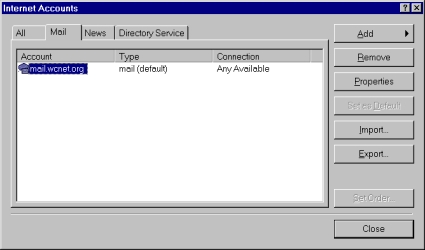
Select your wcnet mail account and click on the Properties button on the right.
A new window will pop up, click on the tab labeled Servers.

Change the Outgoing mail (SMTP) to authmail.wcnet.org
check the check box for the outgoing mail server that reads
My server requires authentication
Click Settings button to open a new window
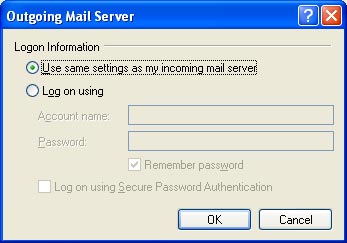
Make sure you have a dot in the Use same settings as my incoming mail server
Click OK to close this window and take you back to the Properties window
Click on the Apply button (this saves the new changes);
DO NOT click OK yet.
click on the tab labeled Advanced.
Check the box for the Outgoing Mail Server that reads:
This server requires a secure connection (SSL).
Change the number in the Outgoing Mail (SMTP) box to 587

Click on the OK button click on the Close button.
You WILL get an error message when sending mail regarding the
signing authority not being recognized. This is OK. You can continue to use the
server as is and just acknowledge the message, OR you can install the
root certificate for the signing authority. To install the root certificate go to
the following web page
cert.php